A FIELD GUIDE TO FOUR LOOKS
Find the look. See the difference.
Start with what is in your photo: a red car, a misty lake, a colorful street. Then choose the color treatment that makes those details stand out.
Four different scenes, each chosen for one look. Every Before / After pair uses the same source, crop and scale. These are actual Luna results, not generated illustrations.
Preview your own photos for free. No sign-up, payment details or photo uploads needed.
01 / Red subjects & strong light
Inspired by Leica · Rich Classic
Rich reds. Deep blacks. A stronger focal point.
Independently developed. No affiliation, authorization or endorsement by the named brands. Original color approximations, not camera color reproductions.
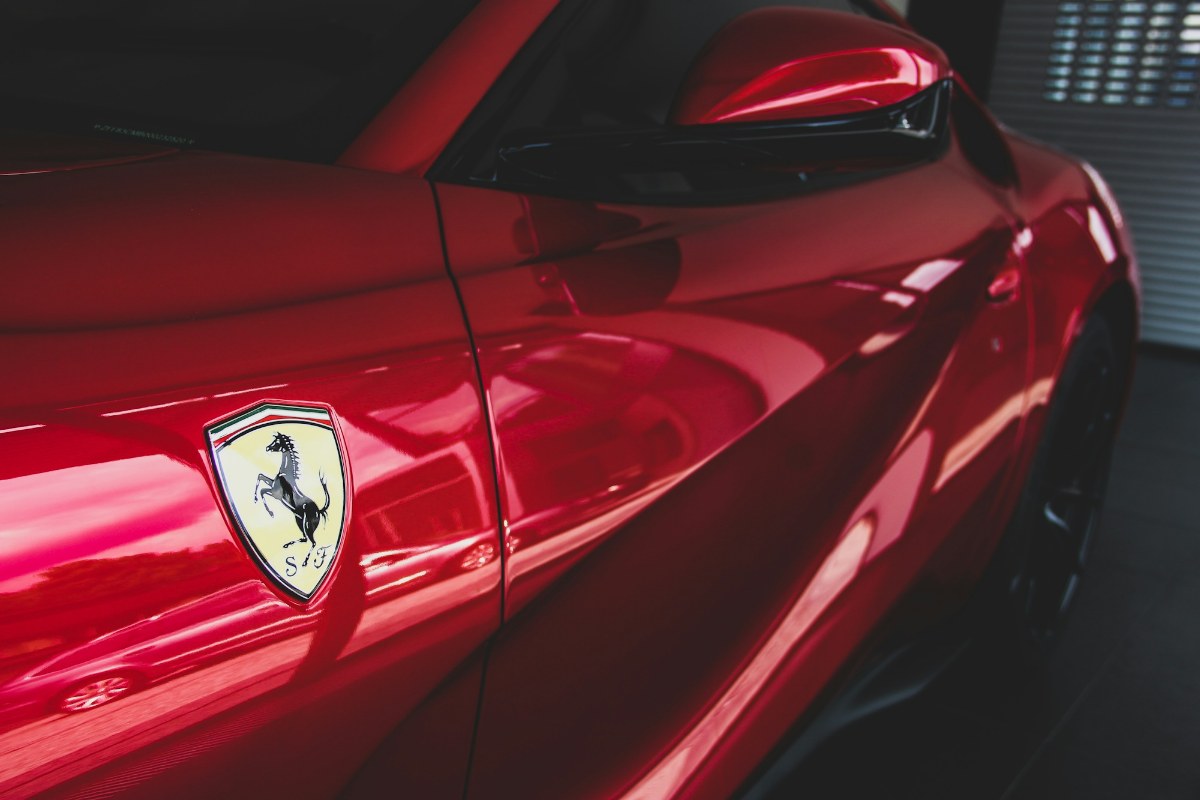
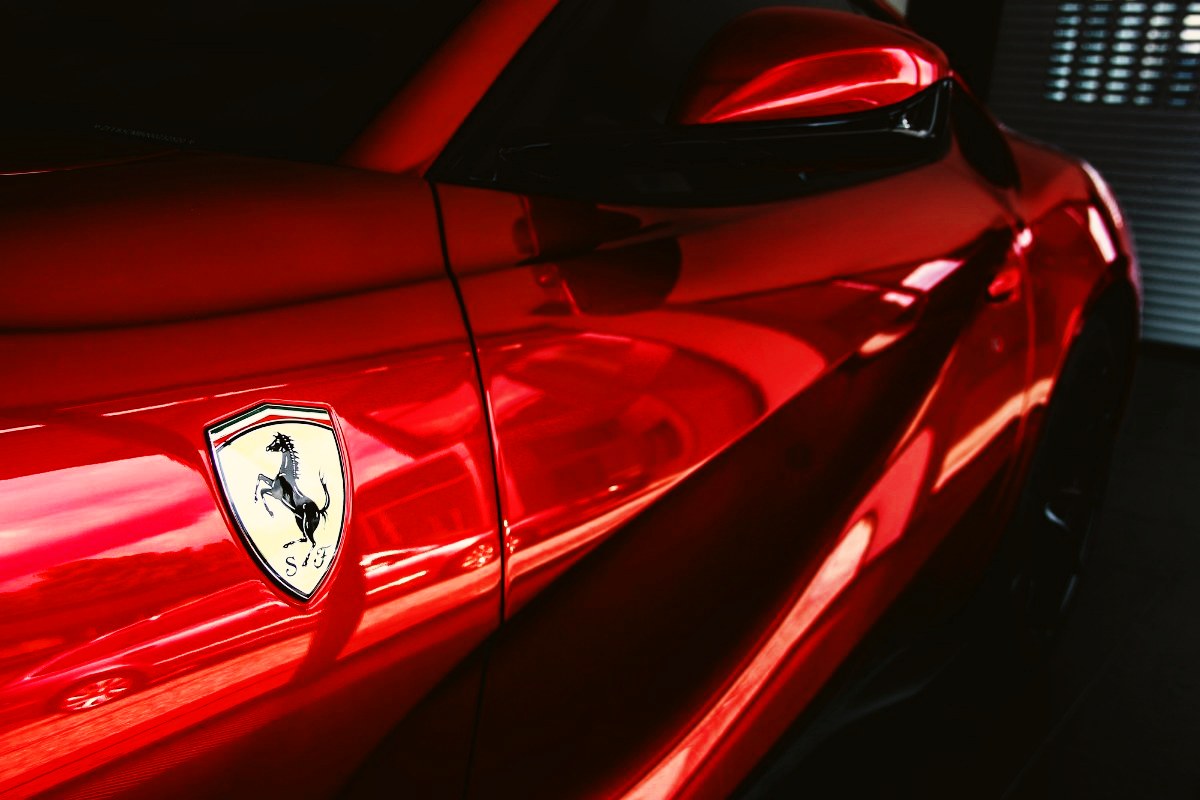
Photo: Viktor Theo · Unsplash
Leica offers more than one look. This Luna interpretation draws on warm color and tonal contrast, adding richer reds, restrained greens and deeper blacks. Try red subjects, foliage and sunlit streets.
Why this photo works
A large red body panel has continuous reflections and shadows beside a dark window, revealing richer reds and stronger tonal separation.
Good for: red subjects, sunlit streets and architectural light and shade.
Where to look
- Look at the lower-left and central red bodyworkRicher reds separate pale reflections from the darker paint.
- Look at the upper window and black mirror trimDeeper blacks make the red bodywork stand out.
- Look at the reflections across the doorGreater separation between light and shade emphasizes the curves.
A selected Luna interpretation, not a universal signature of Leica cameras or official modes.
The sample opens in the studio with this look selected. Hold “See original” to compare in the same position.
02 / Mountains, water & mist
Inspired by Hasselblad · Soft Natural
Forests, water and mist. Open, natural tones.
Independently developed. No affiliation, authorization or endorsement by the named brands. Original color approximations, not camera color reproductions.
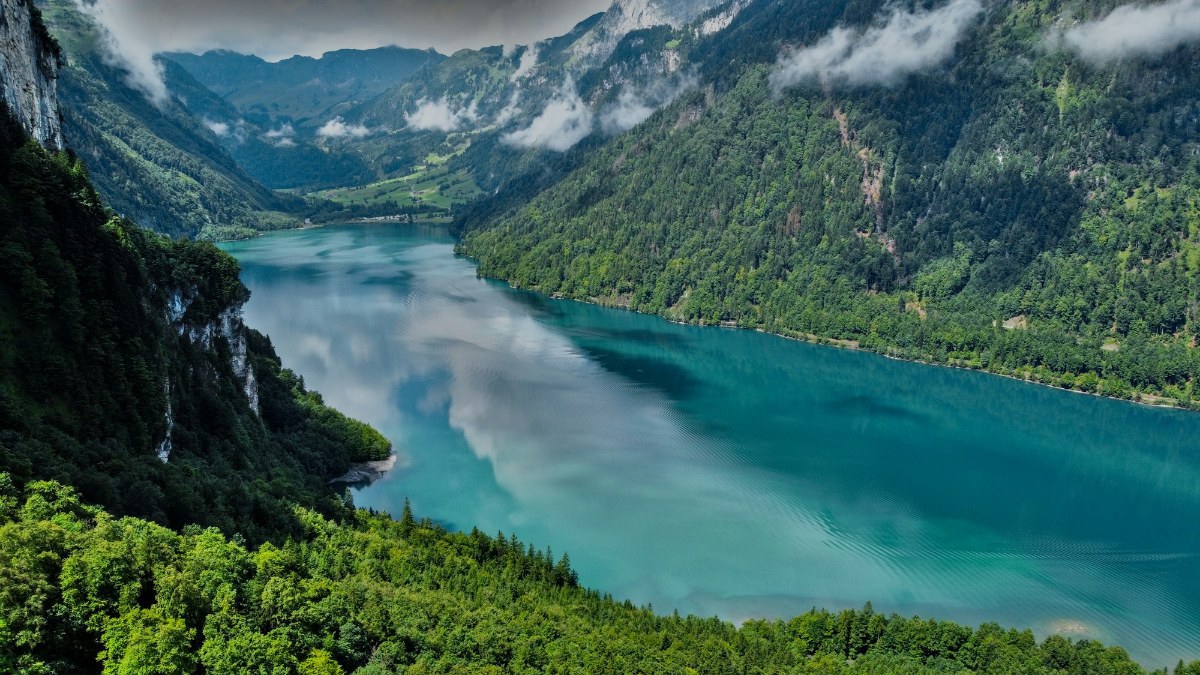
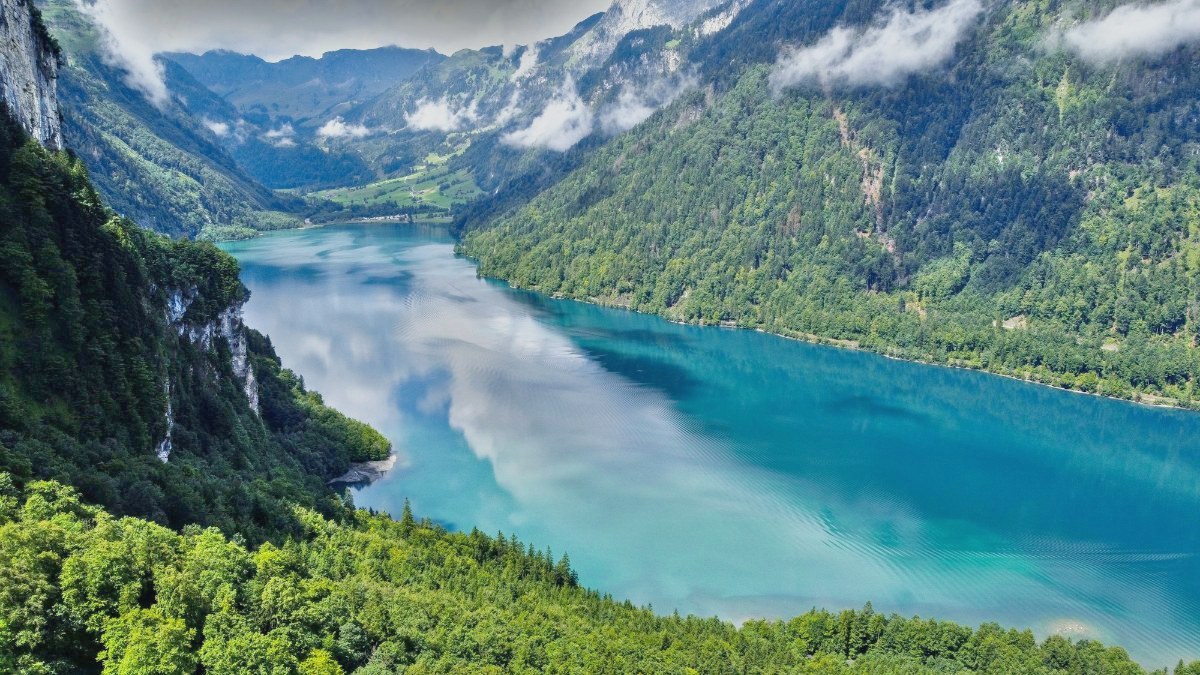
Photo: kodex1213 · Unsplash
Hasselblad HNCS emphasizes natural color and smooth tonal transitions. Luna interprets this direction with brighter midtones, gentler contrast and restrained saturation, opening the tones of forests and water without imposing a heavy cast.
Why this photo works
Dark foreground trees, brighter foliage, blue-green water and white mist reveal changes across light levels and similar colors.
Good for: mountains, forests, lakes, coastlines and natural-light scenery.
Where to look
- Look at the shaded forest on the leftClearly lifted shadows make existing rock and tree detail easier to see.
- Look at the foreground leaves and distant slopesMore open greens feel gentler and less dense.
- Look at the lake and the mountain mistBrighter water and softer tonal transitions give the scene a more open feel.
A natural-color interpretation, not HNCS calibration, added medium-format detail or recovery of clipped sky highlights.
The sample opens in the studio with this look selected. Hold “See original” to compare in the same position.
03 / Bold colors & daylight streets
Inspired by Ricoh · Street Positive
Bold blues and yellows. Crisp street color.
Independently developed. No affiliation, authorization or endorsement by the named brands. Original color approximations, not camera color reproductions.
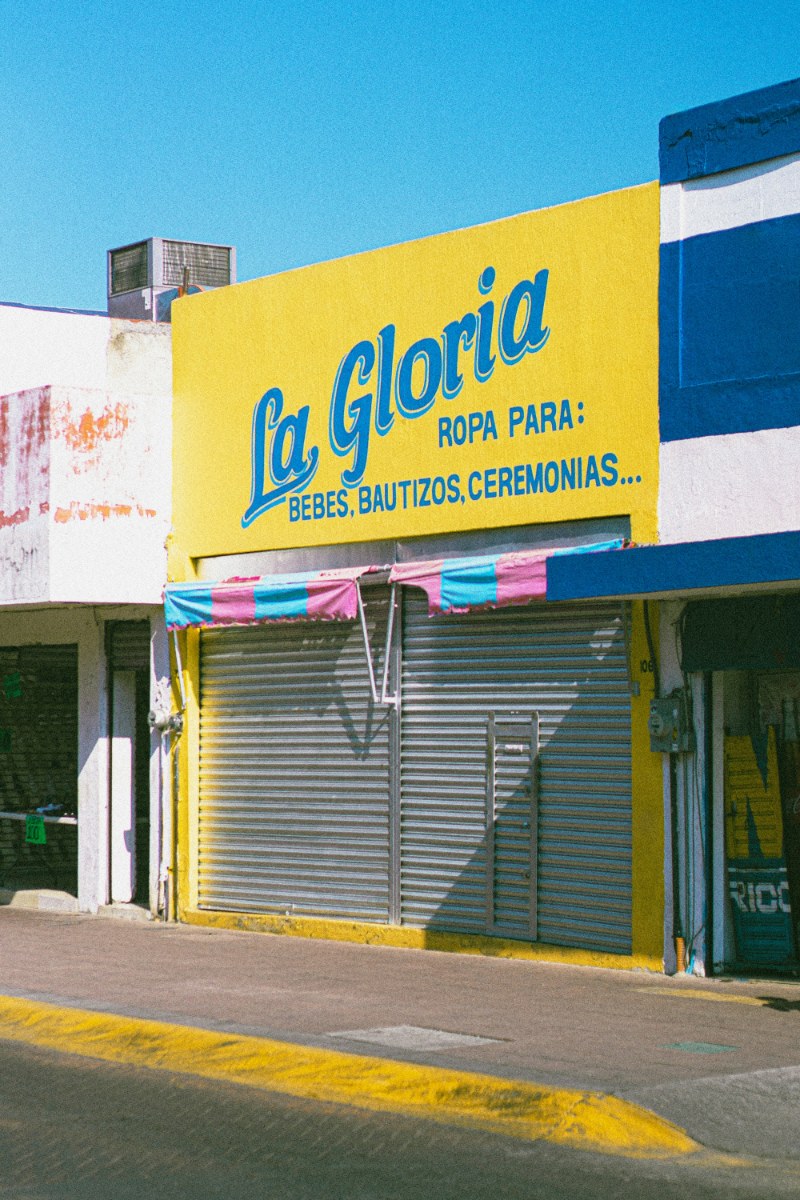
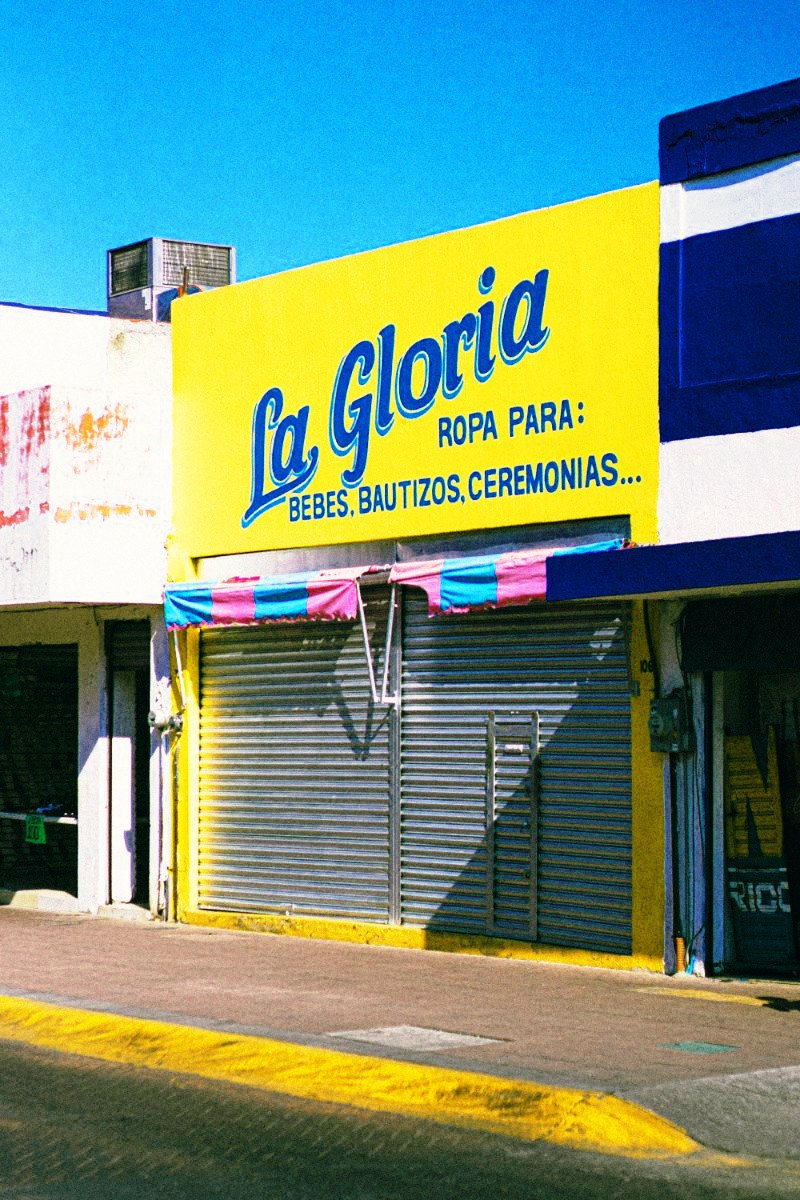
Photo: Ricardo Loaiza · Unsplash
Ricoh Positive Film emphasizes higher contrast and deep, distinctive color. Luna strengthens blues, color separation and shadows for a daylight street look. This does not describe every Ricoh mode.
Why this photo works
The yellow facade, blue lettering and sky provide large color areas, while the entrances reveal shadow contrast.
Good for: colorful storefronts, signs, travel streets and distinct sunlight.
Where to look
- Look at the sky and blue letteringA richer blue sky and deeper blue lettering and paint make the color blocks stronger.
- Look at the yellow signThe yellow-blue separation makes the sign more prominent.
- Look at the right-hand entrance and under the awningDeeper shadows create a crisper boundary against the lit wall.
The source already has grain and photographer color grading. Luna did not add that grain.
The sample opens in the studio with this look selected. Hold “See original” to compare in the same position.
04 / Warm light & nostalgic streets
Inspired by Fujifilm · Everyday Negative
Cool green shadows. Warm highlights. Everyday nostalgia.
Independently developed. No affiliation, authorization or endorsement by the named brands. Original color approximations, not camera color reproductions.
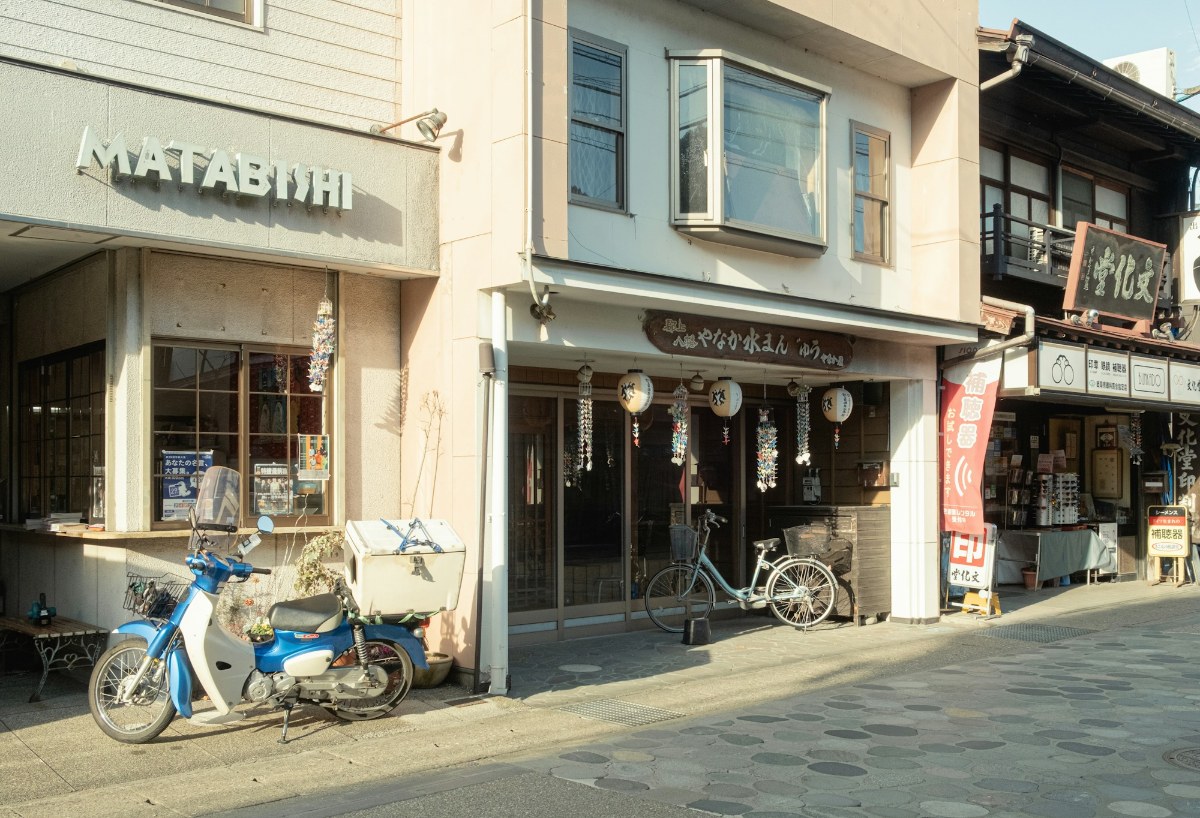
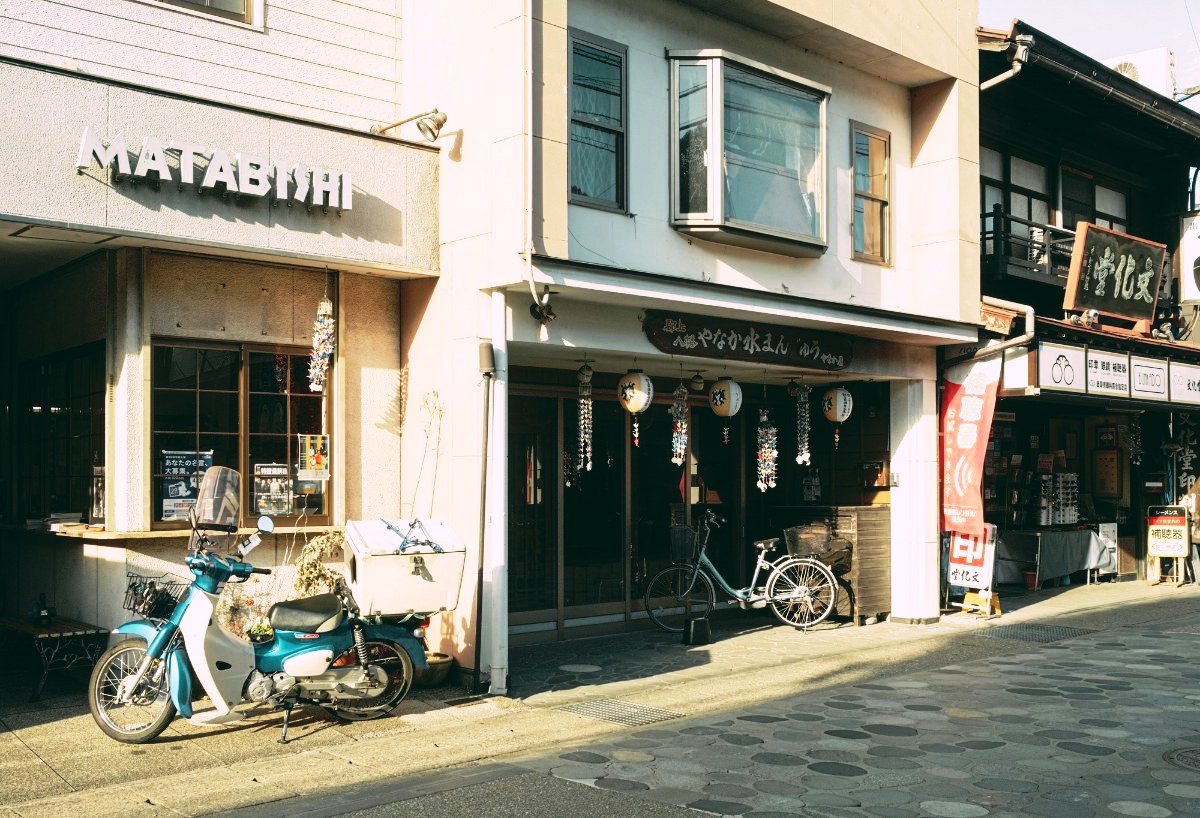
Photo: Tuan P. · Unsplash
Fujifilm has many film simulations. This example takes its direction from Classic Neg.: cyan-green shadows, a magenta lean in highlights and strong color contrast. Luna uses its own recipe for that warm-light, cool-shadow mood.
Why this photo works
Sunlit cream walls, shaded wood, a blue scooter and a red banner reveal both tonal color shifts and warm-cool separation.
Good for: old streets, cafes, wood and everyday scenes mixing warm light with shade.
Where to look
- Look at the sunlit upper-left wallHighlights gain a slight rosy warmth against the cooler shadows.
- Look at the central doorway and under the awningDeeper, green-leaning shadows add a more nostalgic mood.
- Look at the scooter and the red bannerBlue moves toward cyan while red stands out more strongly.
A color interpretation of a film-like look. No grain is added and this is not an official Fujifilm recipe.
The sample opens in the studio with this look selected. Hold “See original” to compare in the same position.
A simple way to choose
Start with a familiar photo
Use a picture whose colors you know. A fairly neutral image makes the differences easier to judge than one that is already strongly filtered.
Compare the details that matter
Choose a look, then hold “See original”. Check the subject, skin if present, bright areas and deep shadows. A strong look can be attractive without suiting every photo.
Add your mark, if you want
Keep the photo clean, choose one of five text fonts, or add your own logo. Adjust its position, size and opacity before downloading.
One look for a whole set
The selected look and watermark settings apply to the whole batch. Start with a few photos in similar light and check each preview; split the batch when lighting or framing differs. Export JPG or PNG copies at the original pixel dimensions, individually or in a ZIP.
Before you start
Will my photo look exactly like the example?
No. Lighting, white balance and existing edits change the result. These are original Luna color recipes inspired by selected camera looks, not official profiles, camera emulation or RAW development. All six fixed looks are available in the studio; this guide shows four color directions.
Can I use it on my phone?
Yes, in a supported mobile browser. JPEG, PNG and still WebP are supported. HEIC / HEIF depends on whether your browser can decode the file; unsupported files get a clear message. Convert a copy on your device when needed. RAW, video and animated images are not supported.
What are the batch and output limits?
Up to 40 photos per batch and 50 MB per file. Mobile: 16 MP / 8192px maximum edge; desktop: 40 MP / 16384px. Older devices may need smaller batches. Oversized files are rejected, not silently resized. JPEG is recompressed; EXIF / GPS, HDR and original color profiles are not retained. Keep your originals.
What is free, and what requires a subscription?
Viewing examples and previewing your own photos are free. Downloading requires an active trial or subscription. The first month is free; then US$1.99/month plus applicable taxes. The web plan includes six looks, five text fonts, your own logos and batch exports.
First month free
Then US$1.99 / month
Payment method required. Automatically renews after the first month, plus applicable taxes, until cancelled. Cancel before the trial ends to avoid the first charge. Removing payment details does not cancel a subscription.
Luna Image was previously Luna Watermark. Checkout and receipts may still show the original name; it is the same subscription.
Source photographs may already include the photographer’s edits. Images are used under the Unsplash License. The displayed After images were processed with the same Luna recipes used in the studio. Unsplash License